Your Team Wants to Copy ChatGPT. Here's What You're Actually Signing Up For.
I keep running into the same conversation.
A team wants to “add AI” to their product. They’ve seen ChatGPT. They’ve seen Copilot. They’ve seen the slick demos. Leadership is asking when we can have something like that. The assumption, spoken or not, is that this is about AI engineering with some UI polish on top.
These days, when someone says: “We’ll just add a chat interface to our product,” I just laugh 🙂
The Mental Model Is Broken
Most people still picture chat like this:
<Input /> → POST /chat → render JSON responseThat’s how chat worked five years ago. It’s not how any modern AI interface works.
Watch ChatGPT closely next time. Words appear incrementally. A spinner shows it’s “searching.” Sources pop in. Tool calls happen mid-response. The response can be stopped, retried, copied, rated. The UI is reacting to a stream of events, not rendering a single response.
The frontend isn’t making a POST request and waiting. It’s opening a persistent connection - usually Server-Sent Events - and processing a sequence of events as the response is being generated. Messages have lifecycle states: drafting, sending, streaming, finalized, errored, interrupted. Tool calls arrive mid-stream. The UI has to show “what’s happening” while the answer is still forming.
This is a fundamentally different architecture than request/response. And most teams don’t realize that until they’re knee-deep in scope creep.
What teams expect:     Input ──→ Response

What actually happens: Input ──→ δ text-delta ──→ δ text-delta ──→ ⚙ tool ──→ δ text-delta ──→ δ text-delta ──→ ■ finish
The Invisible Layer: Streaming Protocols
Here’s where it gets worse.
Even if your team groks “we need streaming,” there’s no standard for what that stream looks like. Every provider has their own event format.
Azure OpenAI:
data: {"id":"chatcmpl-7rCNs...","object":"chat.completion.chunk","created":1692913344,"model":"gpt-35-turbo","choices":[{"index":0,"finish_reason":null,"delta":{"role":"assistant"}}],"usage":null}Vercel AI SDK:
f:{"messageId": "5abeb22c-756b-4070-8cf8-7bad96d5fafd"}
0:"Hi"
0:" Lane"
0:" -"
0:" how"
0:" can"
0:" I"
0:" help"
0:" today"
0:"?"
OpenAI Agents SDK:
data: {"type":"thread.item.updated","item_id":"msg_80ae67e2cd4e","update":{"type":"assistant_message.content_part.text_delta","content_index":0,"delta":"Hello"}}Three different shapes. Three different parsing strategies. Three different assumptions about what metadata you’ll need.
And it’s not just tokens. These streams carry:
- Text deltas (the actual words appearing)
- Tool call invocations and results
- Status changes (thinking, searching, generating)
- Citations and source metadata
- Error states and interruptions
If your agent framework emits events in one shape and your UI framework expects another, someone has to write the translation layer. That’s not a library you install. That’s architecture you own and maintain. I’ve done this before (Langchain Events to AI SDK Stream Protocol) - I wouldn’t do it again.
The choice of how you stream to the client constrains your entire architecture. It’s not a detail you figure out later. It’s foundational.
The UI Isn’t a Chat Bubble
Let’s say your team gets past the mental model problem. They understand streaming. They’ve picked a protocol and built the translation layer. Now they need to build the actual interface.
Stakeholders are expecting ChatGPT. They’re expecting the polish, the responsiveness, the features. They don’t realize that interface represents years of iteration by one of the best-funded product teams on earth.
Here’s what a “chat interface” actually contains:
The Prompt Input
Not just a text box. It handles:
- Draft text with paste/keyboard behavior
- Attachments: add, preview, remove, upload errors
- Tool toggles (search on/off, capabilities menu)
- Model selection
- Send button states: ready, sending, running, streaming, error
The send button alone has five states. And when streaming starts, it probably becomes a “stop” button.
The Message
This is where most of the complexity lives. The assistant’s response is rarely plain text.
Rich text that streams: Markdown with paragraphs, headers, code blocks (syntax highlighted), lists, tables, LaTeX. The catch? Markdown is parsed incrementally. A backtick might start inline code or a code fence - you don’t know until more tokens arrive. Most implementations buffer slightly or use a streaming-aware parser to avoid flickering.
<MessageContent>
  <MarkdownRenderer
    content={message.content}
    isStreaming={message.status === 'streaming'}
  />
</MessageContent>
Citations and sources: When the model grounds its response in retrieved content, the UI needs to show where claims come from. That means inline markers, source cards, hover previews, maybe a side panel. The stream carries citation metadata with byte ranges mapping to source passages.
This isn’t decoration. It’s how users verify the model isn’t hallucinating. I’ve started thinking of this as the “trust contract” - the UI’s job isn’t just to show the answer, it’s to show why you should believe the answer.
<CitedMarkdown
  content={message.content}
  citations={message.citations}
  onCitationClick={(id) => openSourcePanel(id)}
/>
<SourceList sources={message.sources} />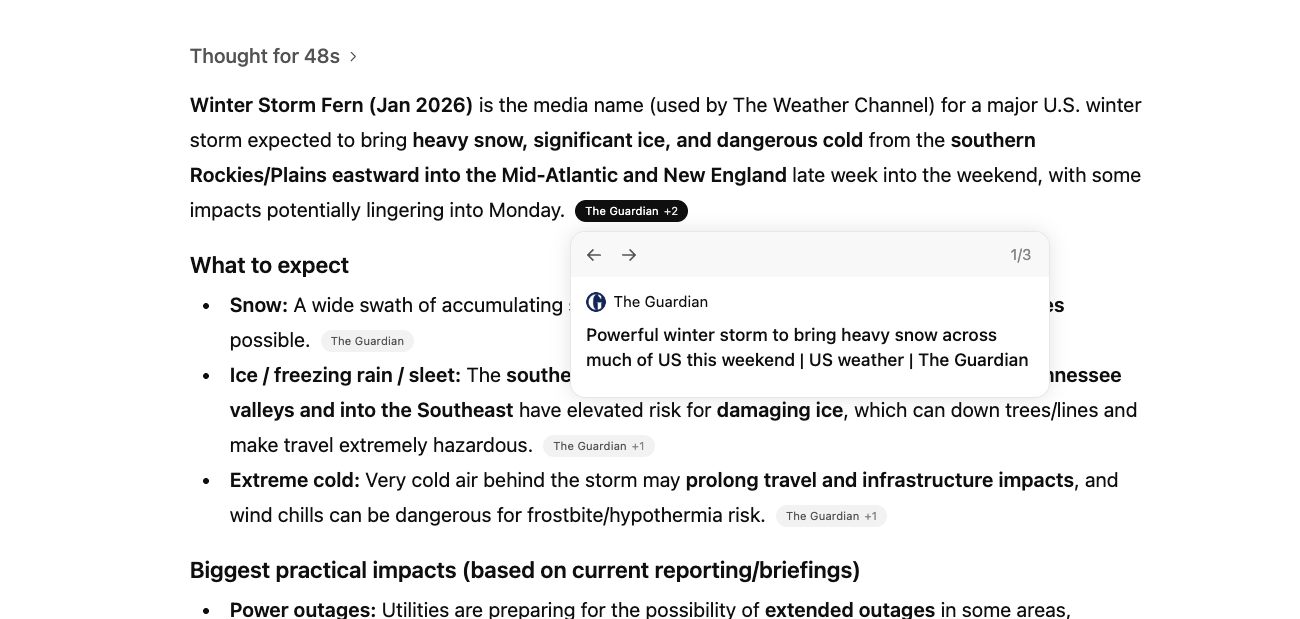
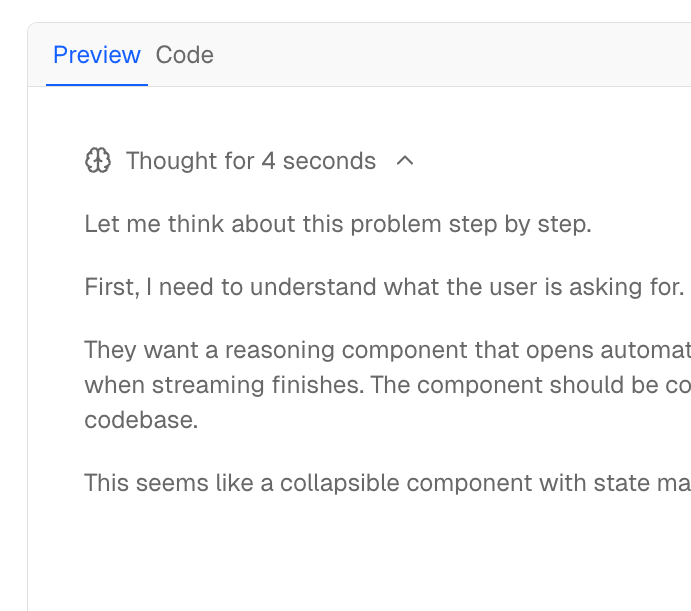
Thinking/reasoning blocks: Some models expose internal reasoning before the final answer. This streams first, can be thousands of tokens, and needs to be collapsed by default with an expandable toggle. “Thought for 12 seconds” indicators. Maybe a live preview while waiting.
{message.thinking && (
  <ThinkingBlock
    content={message.thinking}
    defaultCollapsed={true}
    duration={message.thinkingDuration}
  />
)}
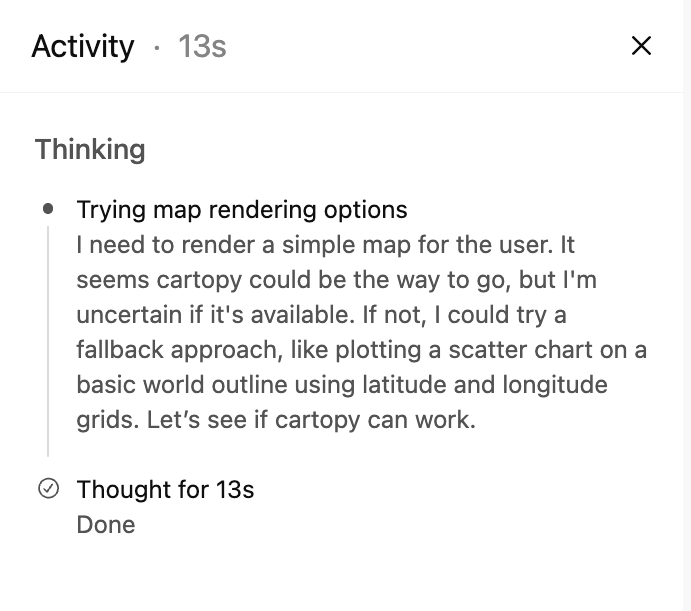
Tool calls and workflows: This is the big one. Modern models don’t just generate text - they search, query databases, execute code, read files. The UI has to show this happening. Status indicators (pending, running, awaiting approval, completed, errored). Parameters being passed. Results rendered inline. Sometimes with accept/reject gates for sensitive operations.
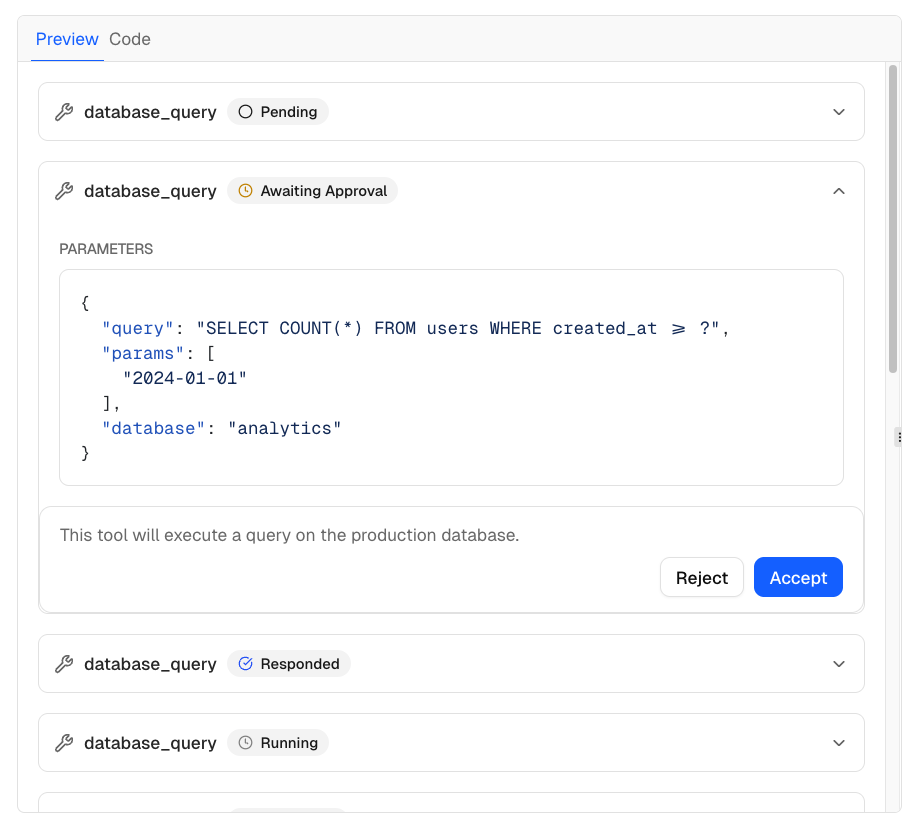
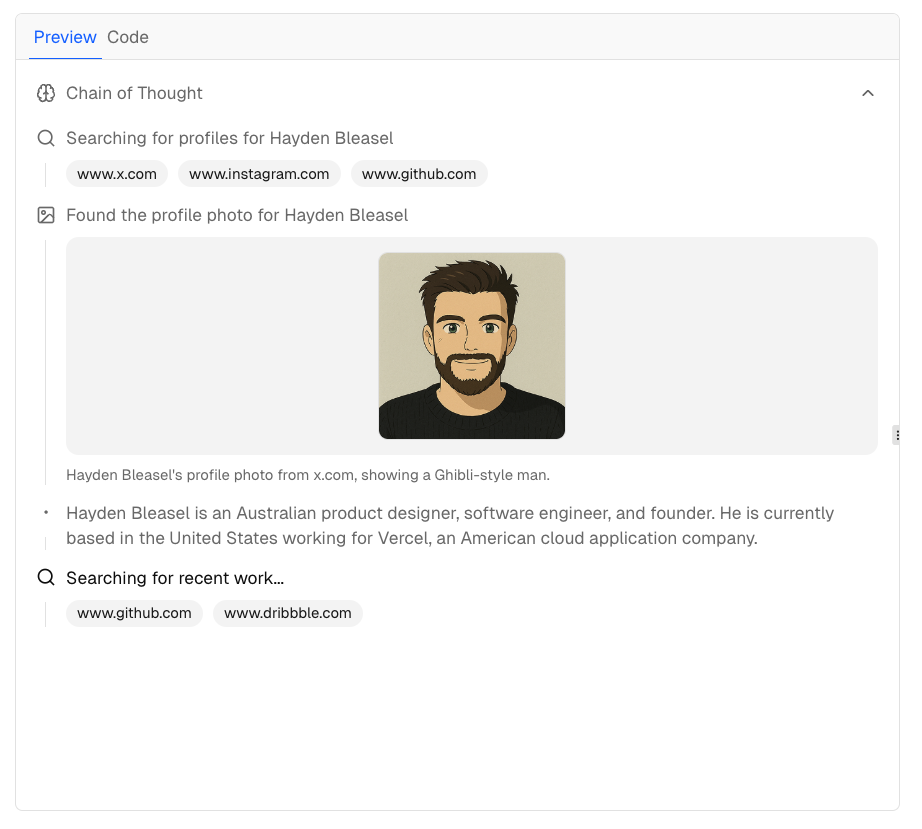
And tool calls happen mid-stream. The model generates some text, pauses to call a tool, waits for results, then continues. Your UI has to handle that gracefully.
Message Actions
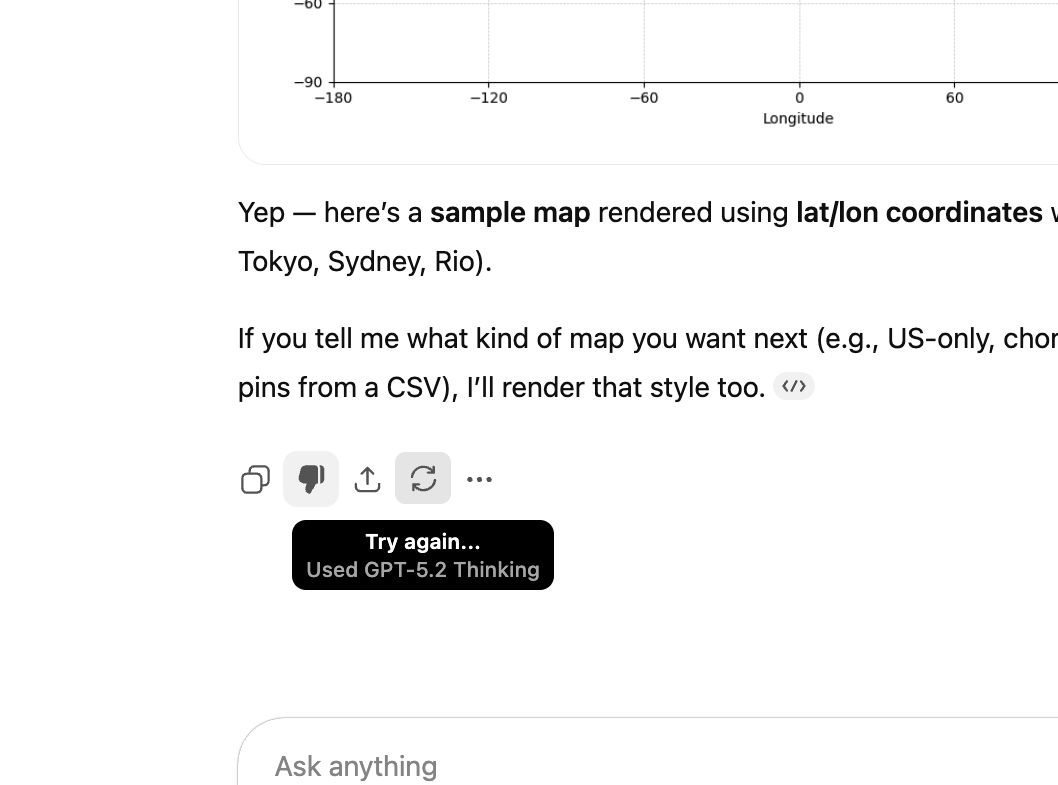
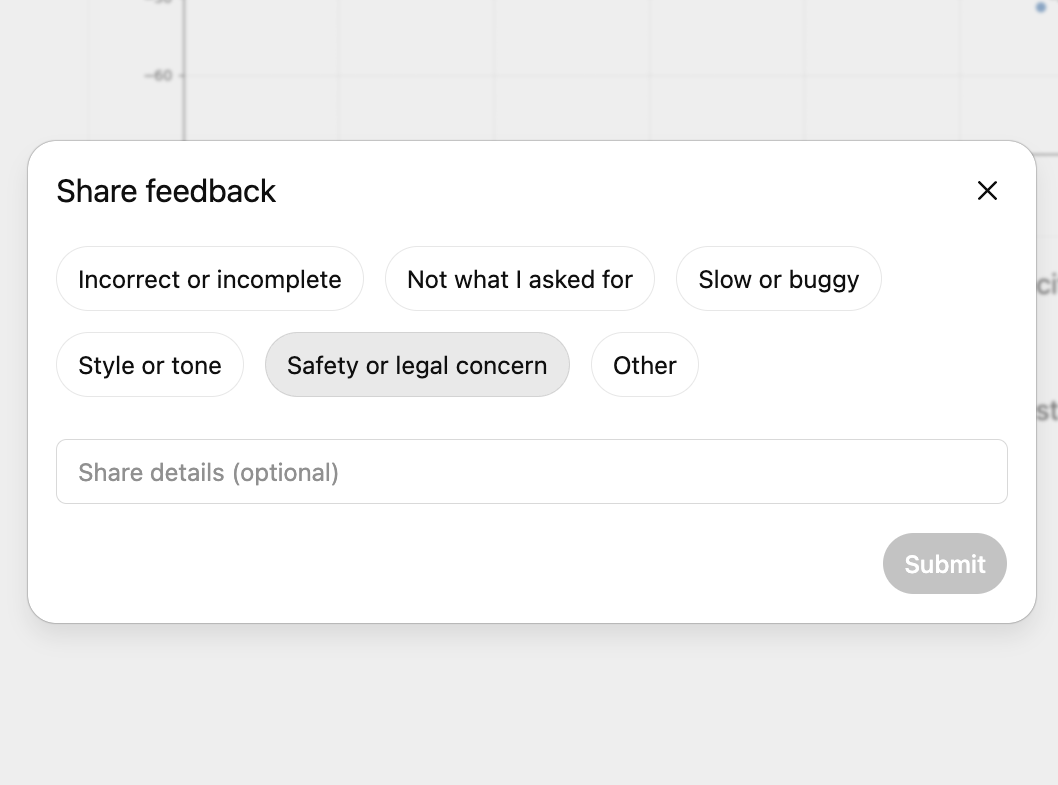
Every message gets a toolbar: thumbs up/down, retry, copy, share. These seem simple.
They’re not.
- Feedback often opens a follow-up modal. Does the vote apply to the whole message or specific parts?
- Retry regenerates from the same input - but now you’re creating a branch. Replace the message or show alternatives? Cancel any in-flight stream first.
- Copy - plain text? Markdown source? Code blocks get their own button usually.
- Share - permission model, privacy concerns, server-side permalink generation.
The Burden Is Real
I cannot imagine writing this from scratch in 2026 and expecting feature parity with ChatGPT. And yet that’s exactly what teams are signing up for when they say “we’ll just build a chat interface.”
Vercel built the AI SDK because even Vercel didn’t want to rebuild this for every project. But most of these tools assume React. If you’re in Angular, Vue, Svelte, or anything else - you’re either porting someone else’s work or rolling your own.
Here’s what I’ve been asking myself:
- Is it reasonable to expect a small team to match the UX of a product backed by billions of dollars?
- Should we be building this at all, or waiting for component libraries to mature?
- If we have to build, where do we draw the line on feature parity?
So What Do You Actually Do?
After all of this, here’s where I’ve landed: don’t build this yourself unless you absolutely have to.
The complexity I’ve described isn’t theoretical. It’s real engineering work that someone has to do. The question is whether that someone is you, or whether you can stand on the shoulders of teams who’ve already solved it.
Component libraries - integrate into your product:
-
assistant-ui - React components purpose-built for AI chat. Handles streaming, markdown, tool calls, the works.
-
Vercel AI Elements - Vercel’s component approach, designed to work with their AI SDK. Path of least resistance if you’re in that ecosystem.
-
OpenAI ChatKit - React components from OpenAI with a framework-agnostic Web Component option. More opinionated, less flexible, but way less work.
-
CopilotKit - Full-stack framework for AI copilots. Goes beyond chat with in-app AI interactions, generative UI, and agent infrastructure.
Standalone apps & templates - fork or self-host:
-
Vercel ai-chatbot - Full-featured chatbot template. Next.js, AI SDK, auth, database - the whole stack. Fork and customize.
-
LangChain agent-chat-ui - Reference app for LangGraph agents. Handles event translation if you’re using LangChain on the backend.
-
LlamaIndex chat-ui - Reference app from the LlamaIndex team. Good starting point if you’re using LlamaIndex for RAG.
-
Hugging Face chat-ui - The open-source interface powering HuggingChat. SvelteKit-based, supports multiple providers, battle-tested at scale.
-
Open WebUI - Self-hosted ChatGPT alternative with all the bells and whistles. Supports Ollama, OpenAI-compatible APIs, and more. If you need a chat interface for internal use, this might be all you need.
-
LibreChat - Multi-provider chat interface with plugin system. Supports OpenAI, Azure, Anthropic, Google, and local models.
-
AnythingLLM - All-in-one AI app with built-in RAG, agents, and multi-user support. Desktop and Docker deployments.
The tradeoff is always customization vs. effort. The more you need the UI to match your product’s design system or handle weird edge cases, the more you’ll end up owning. But starting from a solid foundation beats building from scratch every time.
My honest take: if your team is asking “should we build or buy,” the answer in 2026 is almost always “buy the foundation, build the differentiation.” Nobody’s shipping a better product because they hand-rolled their markdown streaming parser.
Where Does This Leave Us?
If you’re on a team about to “add AI” with a chat interface, here’s what I’d want you to know:
-
The mental model matters. If your team thinks chat is
POST → response, you’re going to have a bad time the moment you try to add streaming, tools, or anything dynamic. -
Pick your protocol early. The streaming format you choose constrains your architecture. Understand what your agent framework emits and what your UI framework expects.
-
Scope the UI honestly. List the features ChatGPT has. Decide which ones you actually need. Be explicit about what you’re not building.
-
The trust contract is real. Citations, thinking blocks, tool call visibility - these aren’t nice-to-haves. They’re how users trust (or don’t trust) your AI.
-
Don’t build what you can buy. Component libraries exist. Use them. Save your engineering effort for what actually differentiates your product.
I’m still figuring this out myself. But I’ve seen enough teams underestimate this that I wanted to write it down.
If you’ve built one of these and have thoughts, I’d love to hear them - @laneparton.
Further Reading
- assistant-ui - React components for AI chat
- Vercel AI SDK - the closest thing to a standard for React
- OpenAI ChatKit - drop-in chat UI from OpenAI
- Azure OpenAI Streaming - Microsoft’s event format
- A2UI (Agent-to-UI) - Google’s open project for agent-driven interfaces (Composer)